Looping.
For Loops
In the previous post we took a look at looping, in the Bash scripting section. We looked at one line for loops, which I’m hoping you went ahead to practice on your own and you are familiar with. We’re going to be looking at that but in Python and also while loops, which we are going to use as we move along in this course flow.
As usual, open up your script, and put in your function for a new line.
Example: Lets create a list, don’t forget lists use brackets [] and not parenthesis (), you can create a list of whatever you like, I chose a list of countries. We are going to write a for loop to iterate through the items in our list, and print them out one after the other.
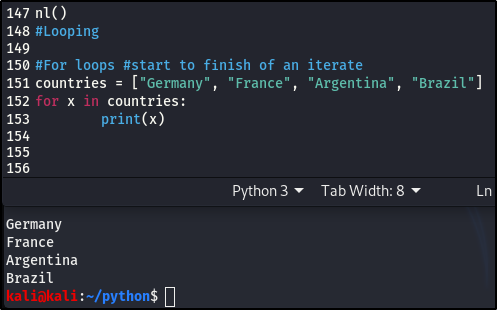
We’ve seen this before, in the Bash scripting post, where we have a list and write a for loop to iterate through it
While Loops.
While loops execute a set of commands or statements as long as the condition is True.
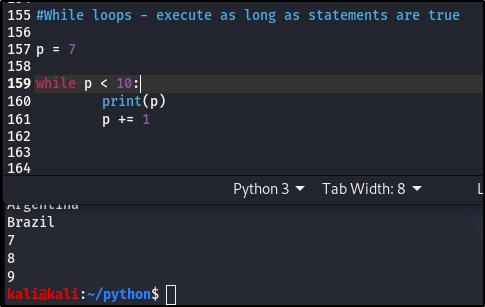
The above just means, p =7 and while p is less than 10, print p. The p += 1, just means that 1 will be added to p after every process and will keep looping, while p < 10, until the condition becomes False. The moment p = 10, the process stops, because the condition is no longer True. Hence, the result, 7, 8, 9.
We’ll look at more practical examples as we move along and it’ll make a lot more sense. I just wanted you to understand that, a for loop is an iterate and a while loop will execute as long as the condition is True.
Importing Modules.
This section is a bit higher than the basics, kinda like beginner intermediate.
For this, we’re going to create a new script (make sure it’s in your python file, so everything is together and organized).
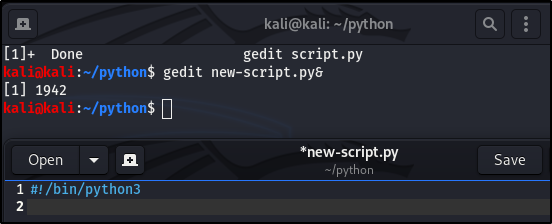
So gedit a new script, you can call it whatever you like, mine is new-script.py.
Don’t forget to declare the she-bang!
A module is a part of a program which contains various routines. In layman’s term-it is a program with different functions to server the main program. There are a lot of built in modules but there a some that are not built in but are available, like sys – it has to do with anything relating to system functions and parameters. sys is very important and we’ll use it quite a lot of times moving forward.
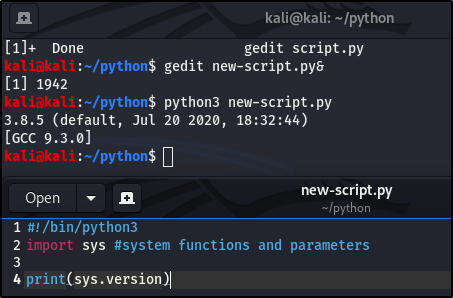
Before any functions can be used from a module, the module has to be imported first. Importing modules are important.
Here is an example of a sys module function:
What if we want to import a specific part of a module, not the entire module, like we did above. For example, we want to import some part of the datetime module, here’s how we would go about it:
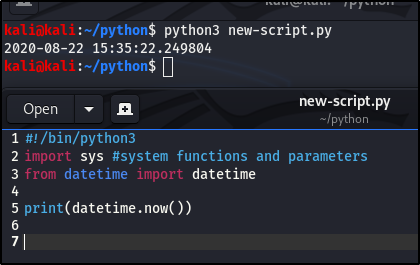
It printed out my current date and time. We can also import with aliases. In our above example, we could add “as dt” and instead of datetime, we’ll use dt. Confusing I know, here’s what that looks like:
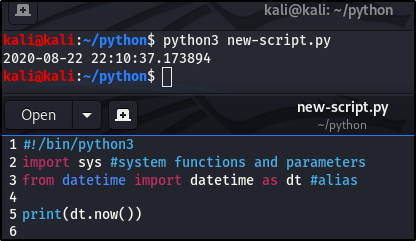
You can see it still works. I think of it like a function, only slightly different.
Importing is important, we’re going to be importing certain modules out of python. We’re going to use this a lot when we start writing our scripts.
Advanced strings.
Most of the things we’ll look at in this section, aren’t things we’re going to use in this course but I still am all for the basics, and it’s also important to be able to understand the syntax, if or when you come across them.
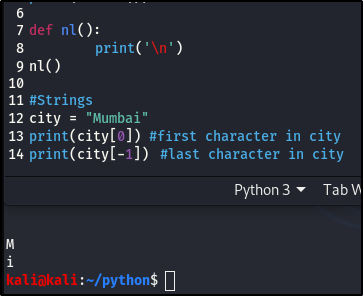
This should be familiar to you from the post on lists, I hope it is.
If we had a sentence and want to print out the first word in it, we would have to know the number of characters in that word and then put in the range of numbers within the bracket.
Like this:
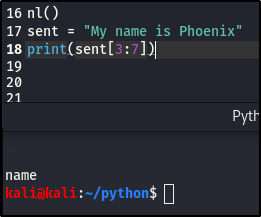
If you count, it’s actually 3:6 but remember, it cuts off before the imputed number, so we go one number up.Hence the 3:7
We can also do a split, which in my case will be, print(sent.split()). The split happens based on a delimiter (which we covered in the Bash scripting post), is a space.
print(sent.split()) – since the parenthesis is empty, it means that every time there’s a space, split. Let’s see how that looks:
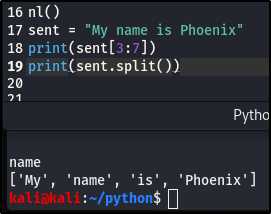
You can see that it breaks the sentence out into individual words, based on a delimiter (space). We’ve succeed in splitting the sentence, now let’s see how to join the words back together into a sentence.
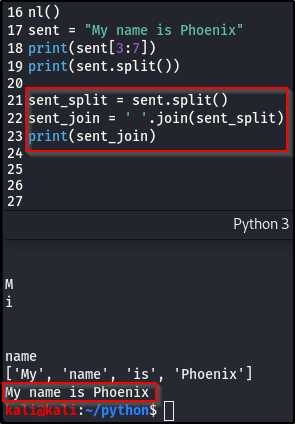
One of the most important thing in this section is, what happens if our sentence has a quote, or is a quote?
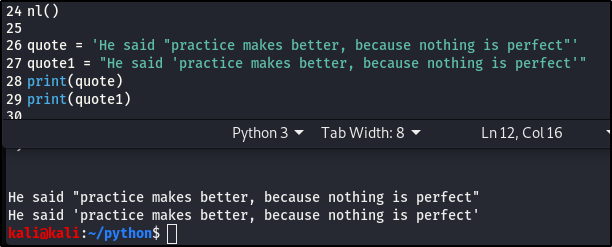
If you remember in the explanation of strings, in Python (Part 1), I explained that strings can be place in single or double quotation marks. So in an instance where you have a quote as a sentence or in a sentence, we can use either double quotation to show it’s a string and single for the quote or single quotations for the string and double for the quote.
In a case where you’re insistent on using the double quotation marks for your quote, you can use the escape character, the back slash (\), at the beginning anD the end of your quote. It’s used to ignore characters that you don’t want to be regarded as errors, in our case, it treats it as a string and not a quotation mark at the end of a string.
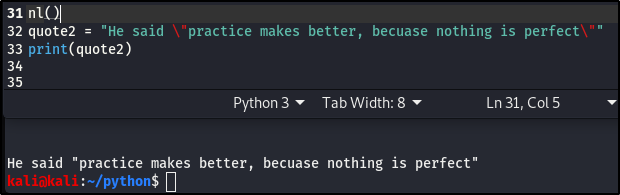
NB: You are going to encounter character escaping as you go along in your career, so please make sure you practice.
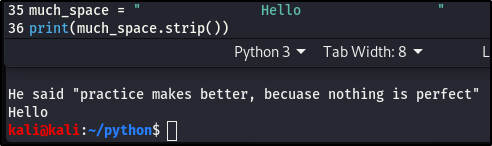
Another feature is the .strip, which takes away too much space between characters. Here’s an example of how that works:
Case sensitivity.
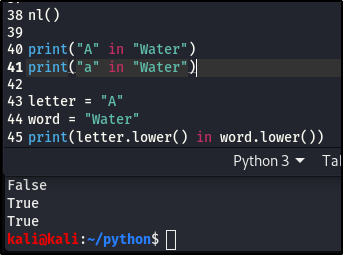
In the above image, we want to know if the letter “A” is in the word “Water” and if you notice, it’s case sensitive. But in a case where, we don’t know if the letter in the word is capitalized or not, we can just make both the letter and the word the same case, as shown above with .lower. In this case, it just searches for the letter without any case sensitivity.
This will come in handy in cases where you’re looking for specific items or key phrases. When searching for specifics, it’s advisable to put all of it in lower case, so it returns the accurate result, without case sensitivity.
One last thing we’re going to look at is a format.
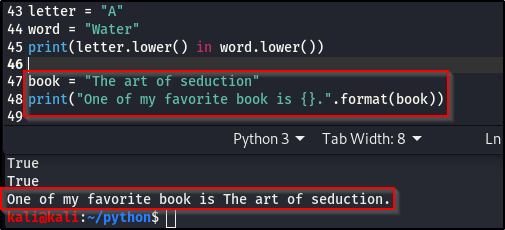
The format() method formats the specified value(s) and insert them inside the string’s placeholder.
In the first Python post, in strings, we talked about concatenation. This method (format()) lets us concatenate elements within a string through positional formatting.
The placeholder is defined using curly brackets: {}.
Overview
• Zero (0) is the first number, when we’re looking at variables, lists, strings. Always start with a zero.
• There are different kinds of methods we can use with sentence. E.g, .strip, .lower, .split, etc.
• When you’re looking into improving your code, do your research, and the best place to start is Google.
• There are better ways to put strings together, instead of concatenation, use format.
• The syntax when it comes to escaping quotes in a string.
Next we’ll be moving onto Dictionaries, Sockets and Building a Port Scanner.
As always, Keep learning. Keep hacking. And don’t forget to breathe!

 Phoenix Information Security