Introduction to Python.
Welcome to Python.
Python is a coding and scripting language, it is commonly used in ethical hacking and all around the world. It’s considered one of the best beginner languages to start with, if you’ve never learnt coding before (I totally agree, as someone who began with C)
Python is called a dynamically typed language. What is dynamic? We don’t have to declare the type of a variable or manage the memory while assigning a value to a variable in Python. Other languages like C, C++, Java, etc.., there is a strict declaration of variables before assigning values to them. We have to declare the kind of variable before assigning a value to it in the languages C, C++, Java, etc
We’re going to start from the basics, as always. We’ll cover:
• Strings
• Maths
• Variable & Methods
• Functions
• Boolean Expressions
• Relational Operators
• Conditional Statements
• Lists
• Tuples
• Looping
• Dictionaries
• Tool Building (this is my favorite part), and some more.
If you’ve programmed before, you’ve probably come across this topics because they are not unique to Python, but if you haven’t, they might look like gibberish and hopefully at the end of this Python basic, you would understand and be familiar with them.
Before we dive in with our training wheels on, just wanted to point out, that you don’t have to be a developer to be successful in penetration testing. As long as you understand what you’re seeing and you also know how to read code. This is my goal for you in this Python section, to be able to understand and read python codes, whenever you see one.
Strings.
Strings are just characters, could be numbers but it’s mostly words, letters and symbols, basically any Unicode character.
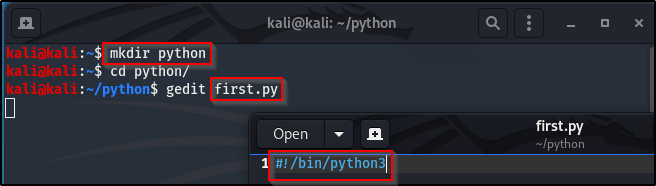
Boot up your VM and create a directory where all your Python code will be stored (I called mine python). cd into your python directory and gedit a new python file (filename.py).
To begin writing python code, we first need to declare the shebang (#!) or hashbang, pound-bang, hash-pling, whichever you prefer to call it. We’ll be writing primarily in Python 3.
The above explanation as shown below:
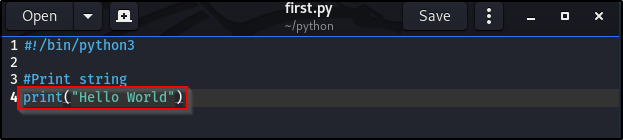
We’re going to print our first string, and as a common practice, our first print is going to be “Hello World”.
Print out of first.py in the terminal, using the python3 filename.py:

As we can see from the above images, “Hello World” was the only thing printed out and that is because # in Python signifies a comment. Comments can be anything after the # and doesn’t get printed out, it is generally ignored when codes run.
Another thing about strings, they are always placed between quotes, single or double. E.g: ‘Hello World’ or “Hello World”. Putting 2 in quotes, makes it a string and not a number, E.g “2” is a string, not number 2. Triple quotations are used to run multi-line strings, as we’ll see in a bit.
String can be concatenated. Concatenation is the process of joining two or more strings together. To make it simpler to remember, every time you hear the word “concatenate”, think “merge”.
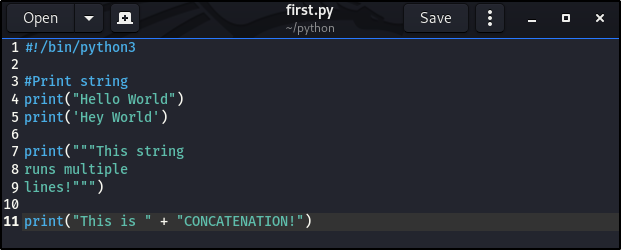
The above printed out:
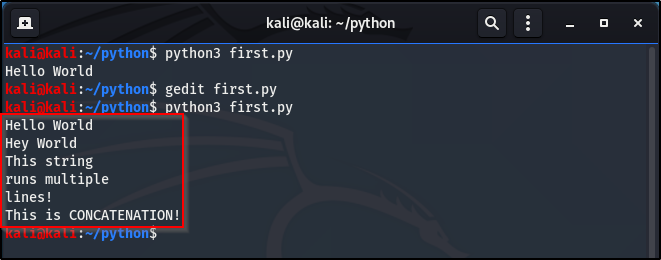
NB: To keep both your terminal and gedit file open simultaneously, place & at the end of the command before you run your Python code. As shown below:

To print a line between two strings (line break), use the ‘\n’, as shown below:

Make it a habit to comment while you code (not excessively or unnecessarily), just so you would be able to follow along if revisiting code after a while and so others can follow and understand your code when they read it.
Maths or Math. (Potato, Potahto)
The nice thing about Python for maths is that it has a built-in maths interpreter and it can be used for basic maths calculations.
Go ahead and gedit a new .py file (I called mine maths.py, obvious) and don’t forget to declare your shebang!. We’re going to perform some very basic Arithmetic problems, you can try out your own problems, I encourage you to play around with it.

Okay, so that last equation wasn’t so basic. The point was to let you know that we can also perform some slightly not so basic arithmetic problems, like exponential equations.

In the above, we see an example of an exponential equation, the ** represents the power of whatever number comes after it. Meaning, 30 to the power of 3.
We also see a new symbol, the ampersand (%). Obviously, 50 is not evenly divisible by 4, so % takes the left over number after the division and prints it. When you divide 50 by 4, you get 12 and are left with the remainder of 2, hence 50 % 4 = 2.
If you were paying a close attention to the basic arithmetic problems, you’d notice that the answers where printed in decimals, which are referred to as floats. Regular numbers are called integers (ints), numbers without decimals.
NB: When using integers, to print out floats (decimal numbers), it is important to note that it won’t be rounded up or down. Example, if you were to do:
print(int(45.2)) or print(int(21.9))
This will print out just 45 and 21, the number wouldn’t be rounded. Don’t forget this!
Lets see how to get none decimal solutions from equations that obviously should result in those kinda answers.

I encourage you to try these arithmetic examples but with random numbers, you’ll understand them a lot more when you try them out yourself, I promise.
Here are the arithmetic operators:
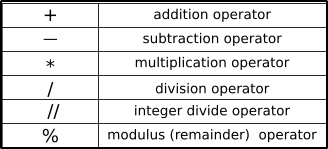
Next we’ll be looking at Variables, Methods & Functions.
Until nest time. Keep learning. Keep hacking! And don’t forget to breathe.

 Phoenix Information Security
One thought on “Python. (Part 1)”